The Great Decoupling
FormLang eliminates the "Part-Whole Relationship" by treating workflows as standalone applications, not platform configurations.
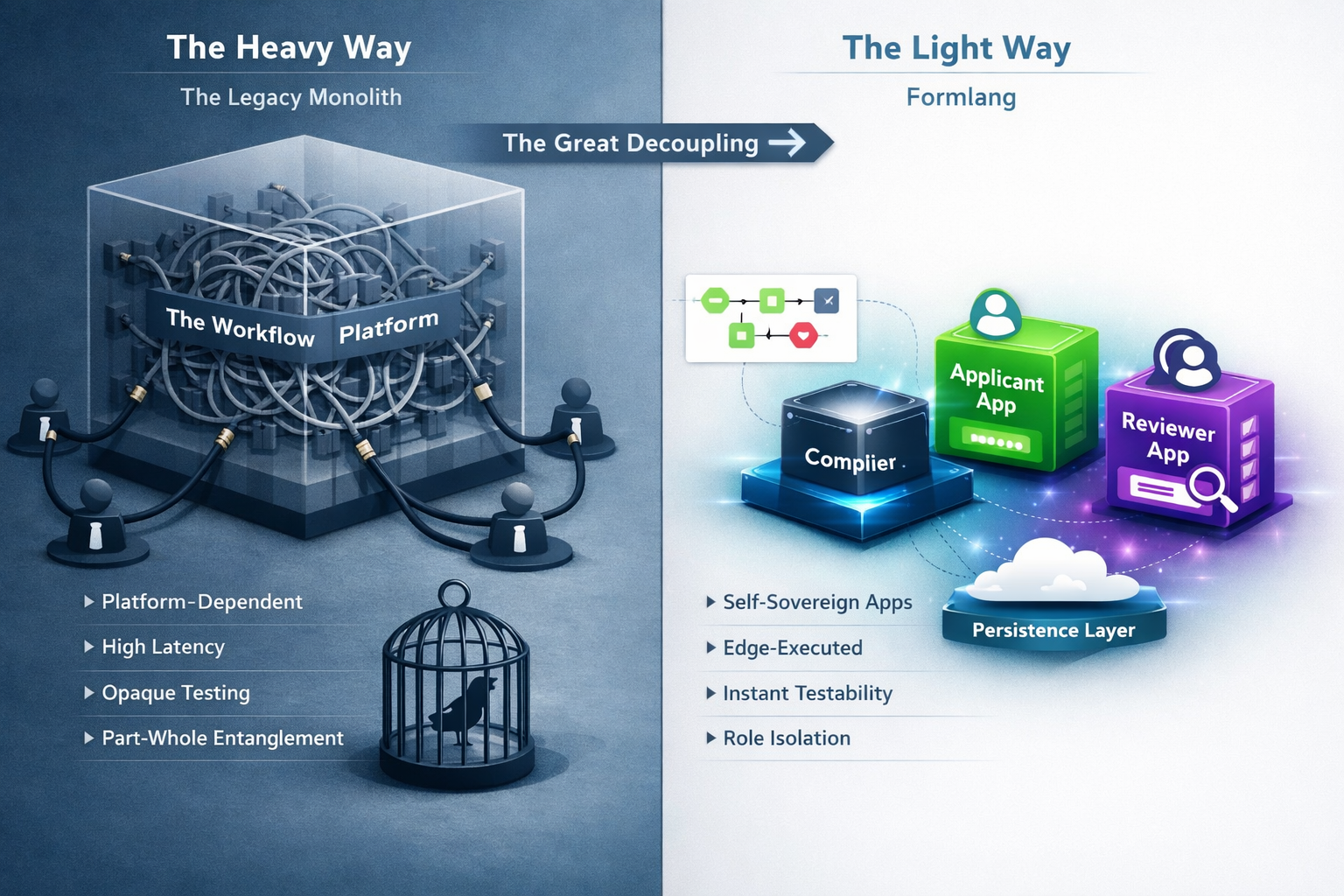
Traditional: Platform-Centric
Workflows are configurations inside heavyweight platforms:
- Logic trapped in platform runtime
- Testing requires entire platform + backend + users
- High latency (every action = server round-trip)
- Rigid vertical scaling only
Architecture: Platform.Execute(Config)
FormLang: Application-Centric
Workflows are compiled applications that run independently:
- Logic encapsulated in browser-based runtime
- Testing in sandbox mode (in-memory, minutes)
- Zero-latency validation (client-side execution)
- Flexible horizontal scaling per workflow
Architecture: new WorkflowApp(BPMN)
Architectural Comparison
See how Application-Centric architecture differs from traditional Platform-Centric approaches:
| Component | Traditional BPMN Platform | FormLang |
|---|---|---|
| Runtime | Server-side engine (Java/Node.js) | Browser-based runtime |
| Storage | Database always required | Optional (isolated sandbox for testing) |
| Frontend | Custom development required | Auto-generated web applications |
| Testing | Full platform stack (server + DB + engine) | Lightweight API only (no database) |
| Deployment | Complex server infrastructure | Simple static hosting |
| Cost (3-role workflow) | Multiple servers + databases | Zero additional servers |
Why This Matters: Application-Centric architecture eliminates database setup and platform engine installation for testing. FormLang requires only a lightweight REST API for state sharing across browsers, while traditional platforms need full server infrastructure. Test data stays in memory, never touching your production database.
Want to Learn More?
Explore the sections above to understand the Part-Whole Relationship Fallacy and how The Great Decoupling enables instant testability, zero-latency execution, and horizontal scalability.
Browser-Executed Workflows
The "Light" Workflow: Break free from heavy backend engines. We compile your logic into a lightweight runtime that lives in the browser.
Traditional (Server-Side)
- Every interaction = server round-trip
- 200-500ms latency per action
- Forms break offline
- Lost work during connection issues
- Constant "heartbeat" overhead
FormLang (Client-Side)
- Workflow logic runs in browser
- 0-10ms instant client-side execution
- Isolated app lifecycle (resume anywhere)
- State-aware navigation (always know position)
- Zero performance overhead
Client-Side Execution Engine
FormLang's browser-based runtime compiles your BPMN workflow into executable logic with mathematical correctness and deterministic behavior. This provides:
- Instant validation (no server round-trips)
- Offline resilience (auto-save to browser storage)
- Resume-anywhere (close app, resume later)
- In-memory testing (no backend needed)
Real-World Impact: Approval Workflow Example
Traditional Platform:
Reviewer clicks "Approve" -> 500ms server round-trip -> validation failure -> form state lost -> frustration
FormLang:
Reviewer clicks "Approve" -> 10ms client-side validation -> instant feedback -> state preserved -> seamless experience
Dedicated Apps Per Role
The "Concierge Experience": Each actor gets a dedicated application experience tailored to their specific workflow role.
The Shared Dashboard Problem
Traditional platforms force everyone into a single dashboard:
- Reviewers see applicant tasks (irrelevant)
- Applicants see reviewer actions (confusing)
- Admins see everyone's tasks (cognitive overload)
- Users constantly ask: "Which tasks are mine?"
Result: 40% productivity loss due to context-switching and manual filtering of irrelevant tasks.
The FormLang Solution
We generate dedicated web applications per role:
- Applicant App: Only sees their submission forms
- Reviewer App: Only sees pending reviews
- Each role gets their own app: No shared dashboard confusion
Result: Users always know where they are and what's next. Zero cognitive load, 40% throughput increase.
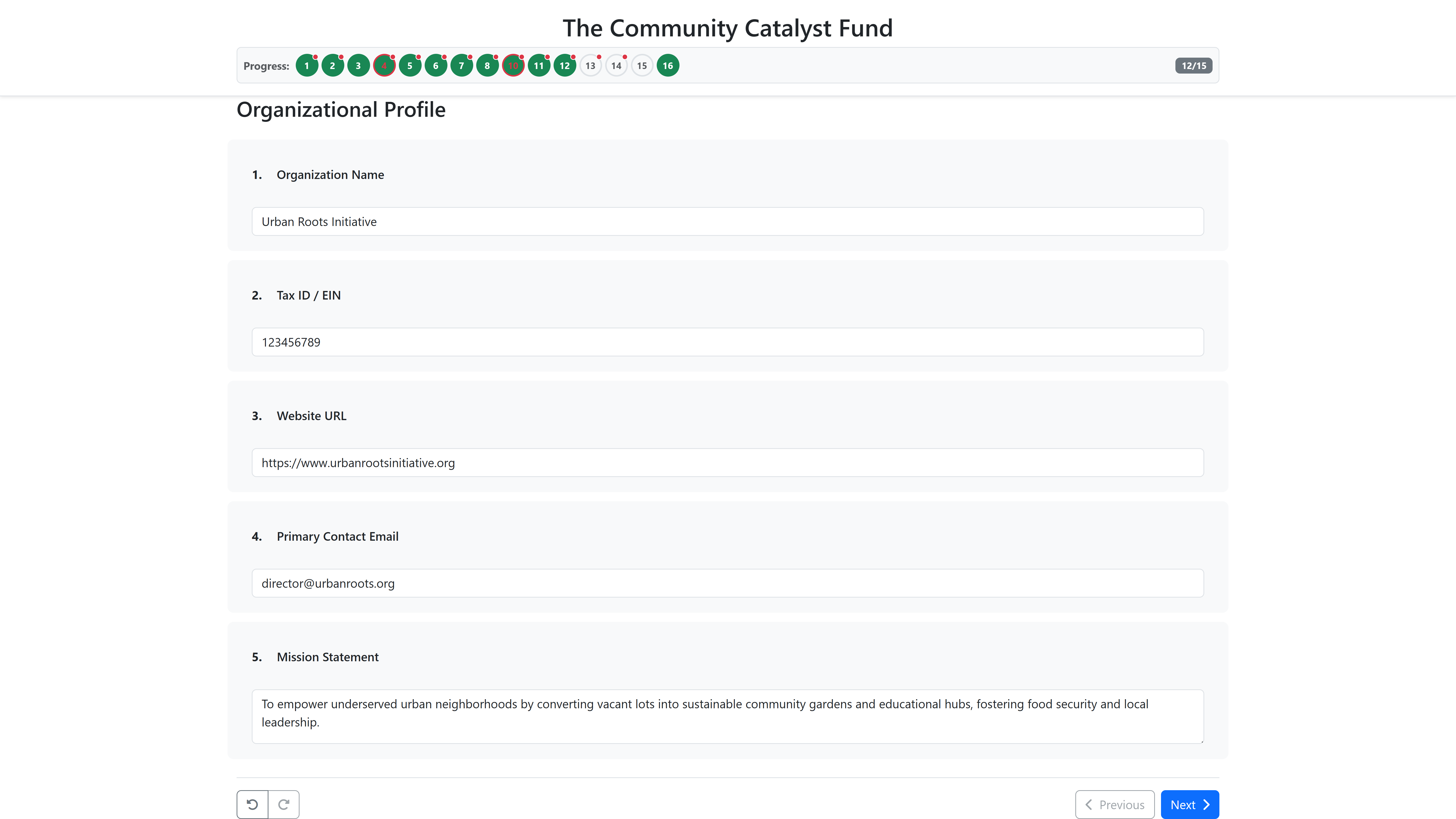
Applicant's Dedicated App
Shows only applicant tasks, forms, and navigation. No access to reviewer features.
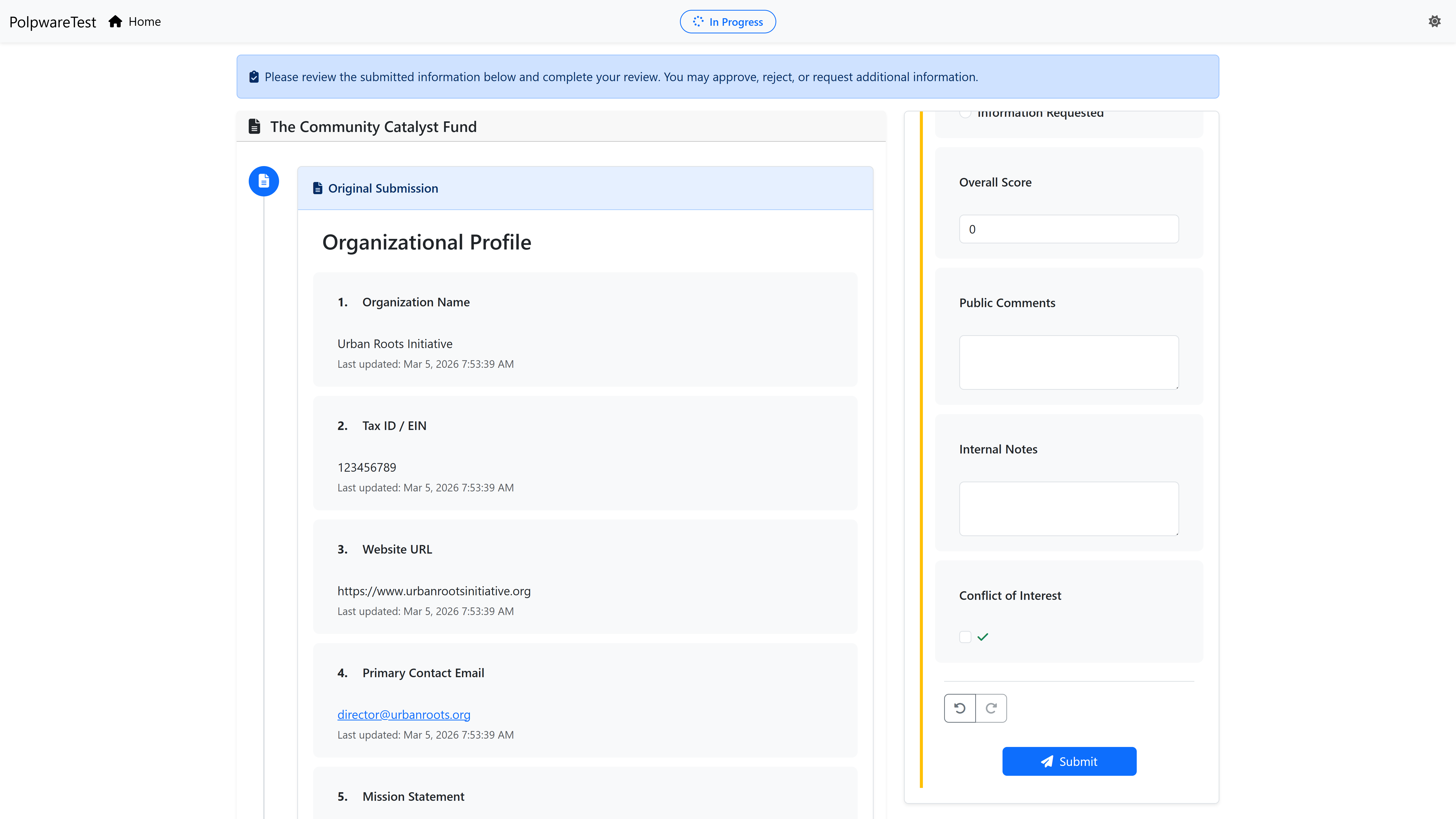
Reviewer's Dedicated App
Shows only reviewer tasks, approval forms, and decision actions. Completely separate from applicant view.
Real-World Impact: Grant Application Workflow
Applicant App
- Submit new grant application
- View submission status
- Respond to reviewer feedback
- Track application progress
Reviewer App
- Review pending grant applications
- Approve or request changes
- View complete application history
- Provide detailed feedback
Unbreakable Workflow Logic
Type-Safe DSLs: Our proprietary logic engine ensures workflows behave exactly as designed - no production surprises.
The Brittle Logic Problem
No-code platforms (Typeform, Zapier) often fail with complex logic:
- Edge-case bugs discovered in production (not design-time)
- Conditional rules that break with unexpected inputs
- No type safety (strings treated as numbers, crashes)
- No testing capability (hope it works when you deploy)
The FormLang Solution: Proprietary DSLs
FormLang uses proprietary domain-specific languages designed exclusively for workflow automation with built-in safeguards:
- Type-Safe Form Definitions: Structural validation and field-level rules
- Type-Safe Business Logic: Safe expressions with built-in testing
- Compiler-Grade Validation: Professional parsing technology ensures correctness
- Deterministic Execution: Predictable, repeatable results every time
Result: Type-safe logic that's tested before deployment, not discovered in production.
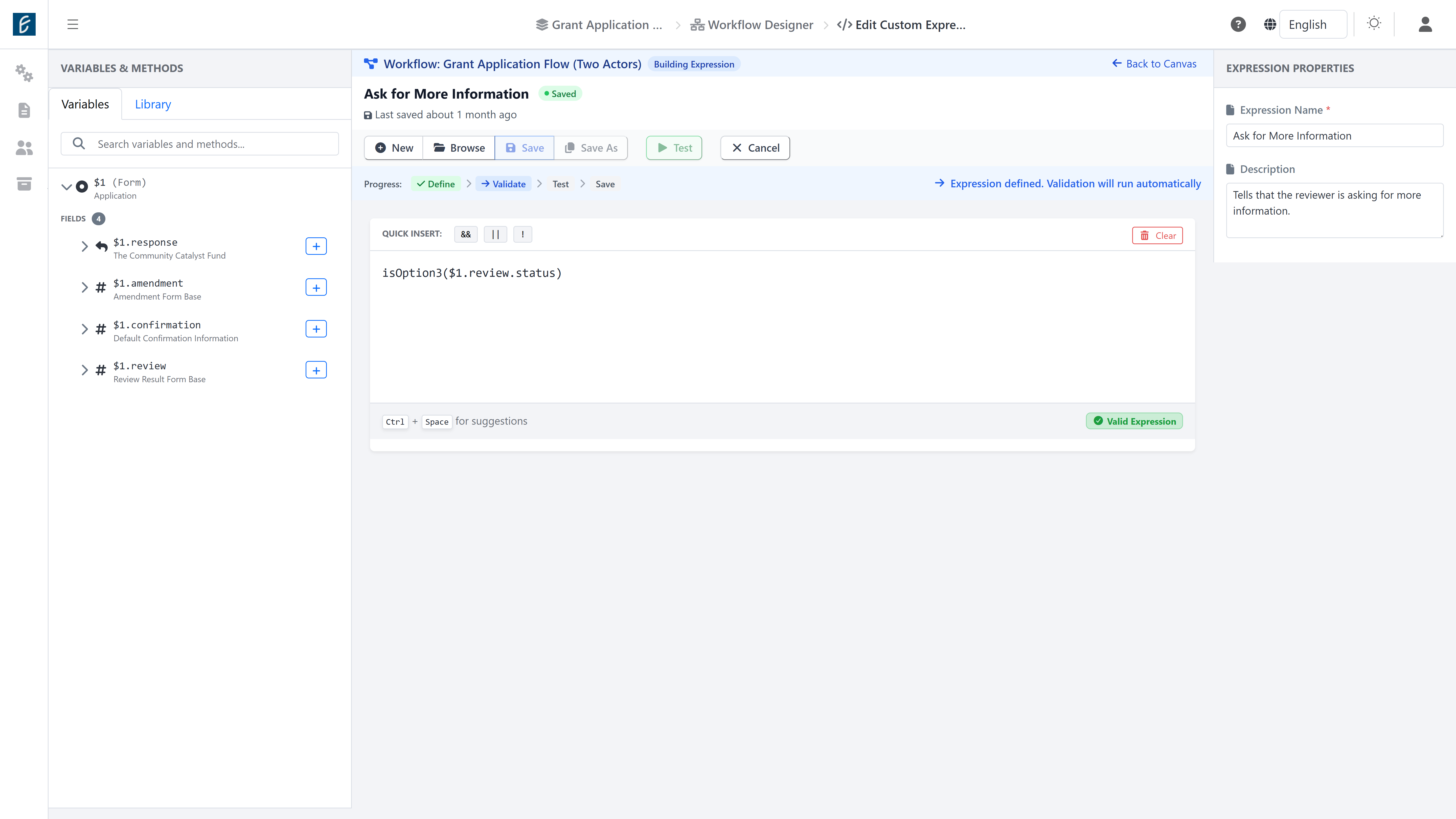
Expression Editor with Built-in Testing
Professional expression editor with IntelliSense, syntax validation, and integrated test cases. Catch errors before deployment, not in production.
Proprietary Logic Engine
Unlike general-purpose scripting languages, FormLang's domain-specific languages are designed exclusively for workflow automation with built-in safeguards:
Form Definitions
- Purpose: Define form structure and validation rules
- Type System: Strongly-typed field definitions
- Validation: Built-in validators (email, phone, regex)
- Safety: Invalid forms rejected at design-time
Business Logic
- Purpose: Conditional routing and data transformations
- Type System: Type-safe transformations (no implicit coercion)
- Testing: Built-in test framework with live feedback
- Safety: Syntax errors caught before deployment
Why DSLs Matter: Domain-specific languages restrict what's possible to prevent common errors. You can't accidentally write SQL injection vulnerabilities or infinite loops because the language doesn't allow them.
Real-World Impact: Edge-Case Bug Prevention
Traditional No-Code Platform:
Grant amount rule: "If budget > $50k, require VP approval"
User enters "$50,000.01" -> String comparison fails ->
Rule doesn't trigger -> Bypass approval ->
Production bug discovered after launch
FormLang (Type-Safe DSL):
Grant amount rule: Type-checked as Decimal at design time ->
Test panel validates edge cases ->
"$50,000.01" correctly triggers approval ->
Bug prevented before deployment
Test with Confidence, Deploy with Certainty
Zero Environment Drift: Test in sandbox mode, demonstrate to stakeholders, then promote to production—all from one diagram.
The Risky Deployment Problem
Traditional platforms force you to test in production:
- Every test requires full backend (database, APIs, services)
- Test data pollutes production database
- No safe way to validate before deploying
- Bugs discovered by real users (not in testing)
The FormLang Solution
FormLang's unified architecture eliminates the gap between testing and production:
- Sandbox Mode: Isolated testing environment, safe validation, instant feedback
- Production Mode: Full persistence, real users, complete audit trails
- Demo Mode: Interactive showcases with sample data, reset-on-demand
Result: The workflow you test IS the workflow you deploy. Zero environment drift, zero configuration differences.
Sandbox Mode
Browser LocalStorage, no backend required. Test workflows instantly without database setup.
Production Mode
Database API with full persistence. Live workflows with multi-user coordination.
Demo Mode
Isolated instance with sample data. Showcase workflows without affecting production.
The "One Diagram, All Modes" Approach
Traditional platforms require separate configurations for testing and production. FormLang uses a single BPMN diagram that adapts to different deployment contexts:
Traditional Platforms:
// Separate configurations
TestEnvironment.Deploy(workflowXML)
ProdEnvironment.Deploy(workflowXML)
// Risk: Configuration drift
FormLang:
// Single diagram, multiple modes
WorkflowApp(bpmn, sandbox)
WorkflowApp(bpmn, production)
// Guarantee: Same logic, different context
Why Unified Architecture Matters
This unified approach gives you what traditional platforms can't:
- Test Accuracy: Sandbox testing uses identical logic to production
- Deployment Confidence: What passes testing will work in production
- No Configuration Drift: Single diagram eliminates version conflicts
- Flexible Deployment: Run the same workflow across multiple contexts simultaneously
How The Pillars Work Together
These architectural innovations aren't isolated features. They have logical dependencies that create a complete solution.
Zero-Gravity Enables Role Isolation
Because workflows are "light" (browser-executed), we can economically generate multiple isolated applications per role. Traditional "heavy" workflows would require multiple servers and databases for multi-role workflows.
Deterministic Logic Enables Strategy-Based Deployment
Because logic is deterministic (predictable), testing in sandbox mode reliably predicts production behavior. Non-deterministic workflows make sandbox testing meaningless.
All Four Together Solve The Last-Mile Gap
Foundation Pillars (I + III):
- Make workflows light and reliable
- Enable browser-based execution
- Provide instant validation
Outcome Pillars (II + IV):
- Generate complete applications (UI + state machine + navigation)
- Enable safe testing and flexible deployment
- Deliver "Test in Minutes" promise
How The Four Pillars Come to Life
The four architectural pillars are implemented through integrated platform capabilities that work together seamlessly.
Application Synthesis
Implements: All 4 Pillars
The compiler that transforms BPMN diagrams into complete standalone web applications. Generates UI, state machines, navigation, forms, and authentication - everything needed to deploy in minutes.
- One-click deployment from BPMN
- Role-specific app generation
- Professional UI with context-aware navigation
- Zero "last mile" development required
Design Studio
Implements: Pillar III (Deterministic Logic)
Professional-grade tools for workflow architects. Visual canvas, expression editor, form creator, and integration hub work together to design enterprise-grade workflows with type-safe logic.
- Drag-and-drop BPMN 2.0 designer
- Type-safe Expression & Form Languages
- Built-in testing framework
- AI agent & webhook integration
Runtime Experience
Implements: Pillar II (Role Isolation)
What participants experience when using FormLang-generated applications. Auto-navigation, split-views, and timeline history create a "concierge" UX that guides users through complex workflows.
- Automatic navigation (never get lost)
- Split-view for context + action
- Timeline history for multi-round workflows
- Professional forms with undo/redo
Engineering Foundation
Implements: Pillar IV (Multi-Strategy)
Built for production with state persistence, in-memory testing, XML portability, and thread-based audit trails. Enables sandbox testing and flexible deployment strategies without backend complexity.
- In-memory sandbox mode (test without DB)
- State persistence (browser + server)
- BPMN 2.0 XML export (portability)
- Complete audit trails (compliance)
Integrated Platform: These capabilities work together seamlessly. Design in the Studio -> Compile with Application Synthesis -> Test with Runtime Experience -> Validate through Engineering Foundation - all within a single workflow.
How FormLang Compares
FormLang sits at the intersection of BPMN-driven engineering and No-Code application synthesis. We don't just build workflows - we generate distributed state machines with high-fidelity user interfaces.
| Dimension | FormLang |
Form Builders (Typeform) |
BPMN Engines (Camunda) |
General Workflow (Monday.com) |
|---|---|---|---|---|
| Output | Standalone Web Apps | Single Web Form | API / XML File | Shared Dashboard |
| Logic Location | Client-Side (Edge) | Server-Side | Server-Side | Server-Side |
| Multi-Actor | Isolated Environments | Shared/Linear | Complex Manual Setup | Shared Dashboard |
| UX Context | Integrated (Split-View, Timelines) | None (Sequential) | Requires Custom Code | Generic Task Lists |
| Logic Rigor | Type-Safe DSLs | Basic Logic Jumps | Developer Defined | If-Then Rules |
| Standards | BPMN 2.0 (Full) | Proprietary | BPMN 2.0 (Partial) | Proprietary |
| Testability | In-Memory Sandbox | Limited Preview | Requires Test Environment | Production Testing Only |
Why These Dimensions Matter
Output (Standalone Web Apps):
Traditional platforms stop at "logic" (APIs/XML). You still build the UI yourself. FormLang generates complete applications with professional UX, eliminating 6-8 weeks of development time.
Logic Location (Client-Side Edge):
Server-side execution means 200-500ms latency per action. Client-side execution delivers 0-10ms instant validation, offline capability, and zero lost work.
Multi-Actor (Isolated Environments):
Shared dashboards create cognitive load (users see irrelevant tasks). FormLang's role-isolated apps deliver "concierge experience" - participants always know where they are and what's next.
Testability (In-Memory Sandbox):
Traditional testing requires full backend (servers + databases). FormLang's browser-only sandbox lets you test 100-step workflows in minutes, not weeks.
vs. Form Builders
Unlike single-purpose form builders, FormLang is designed for workflows from the ground up. Build multi-actor processes, not just data collection forms.
vs. BPMN Engines
Unlike traditional BPMN engines that output APIs and XML, FormLang generates complete web applications with professional UX. No "last mile" development required.
vs. General Workflow
Unlike shared dashboards that confuse users with irrelevant tasks, FormLang generates role-specific applications. Each participant sees only their tasks, always in context.
Ready to Build Your First Workflow?
Now that you understand how the platform works, choose the path that's right for you.
No credit card required | Free tier forever | Industry-standard BPMN 2.0