Manual Grant Processing is Broken
Research universities receive hundreds of grant applications annually, but manual email-based review processes create bottlenecks and errors.
Pain Points
- Lost applications: Email attachments get lost, no centralized tracking
- Manual tracking: Excel spreadsheets prone to errors and version conflicts
- Slow turnaround: Average 14 days from submission to decision
- No visibility: Applicants have no status updates, constant inquiries
- Missed deadlines: No automatic reminders for reviewers
- No audit trail: Difficult to prove compliance with funding agency requirements
The Cost of Manual Processes
One major research institution estimated they lost $500K+ annually in grant opportunities due to slow processing, missed deadlines, and applicant frustration.
Before FormLang
1. Email Submission
Applicant emails form to generic address. Often lost in inbox clutter.
2. Manual Data Entry
Staff copies data from email to Excel spreadsheet. Version conflicts common.
3. Email Forwarding
Staff forwards to director via email. No tracking, no reminders.
4. Wait & Hope
Applicant waits 14+ days with no status updates. Constant email inquiries.
Average Processing Time: 14 days
With 30% applications lost or significantly delayed
With FormLang
1. Online Submission
Applicant fills structured form with validation. Instant confirmation email.
2. Automatic Routing
Workflow automatically assigns to director. Notification sent instantly.
3. Review & Decide
Director reviews via portal. Approve, reject, or request more info.
4. Automatic Notification
Applicant receives decision instantly. Complete audit trail maintained.
Average Processing Time: 5 days
With 100% tracking and zero lost applications
Automated BPMN Workflow
FormLang transforms grant application processing with a visual BPMN 2.0 workflow that automates routing, notifications, and tracking.
How It Works
- Design Workflow: Grant office designs BPMN workflow in visual designer (no coding)
- Generate Application: FormLang automatically creates web application with forms, validation, and routing
- Applicant Submits: Structured online form with real-time validation and progress tracking
- Automatic Routing: Workflow routes to director, sends notification with link to review portal
- Director Reviews: Views application in portal, makes decision (approve/reject/request more info)
- Conditional Logic: Workflow branches based on decision (if approved → notify award, if rejected → notify reason, if more info → return to applicant)
- Audit Trail: Complete thread-based history of all actions, timestamps, and decisions
Standards-Based Solution
Built on BPMN 2.0 industry standard—no vendor lock-in, interoperable with other systems, and future-ready for emerging standards.
The Workflow Design: BPMN 2.0 in Action
The grant application workflow involves two participants: Applicant and Reviewer. Each has their own process, coordinated via message events.
BPMN Diagram: Grant Application Workflow
Two lanes: Applicant Process (top) + Reviewer Process (bottom)
Message flows connect the two processes for coordination
Applicant Process
The applicant's journey through the grant lifecycle:
- Start: Begin application
- User Task: Fill application form (input mode)
- Subprocess Task: Verify application data (view mode)
- Throw Message: Notify reviewer of submission
- Catch Message: Wait for reviewer's response
- Gateway: Evaluate review result
- If Accept/Reject → Acknowledge decision → End
- If Request More Info → Submit supplement → Loop back to step 4
Key Feature: The applicant's app automatically navigates to the correct task based on workflow state (waiting, reviewing feedback, submitting supplements).
Reviewer Process
The reviewer's journey through the grant review:
- Start: Begin review session
- Catch Message: Wait for application submission
- Subprocess Task: Review application
- View-mode application (left pane)
- Input-mode review form (right pane)
- Split-view layout for easy reference
- Throw Message: Send review result to applicant
- Gateway: Evaluate review decision
- If Accept/Reject → End
- If Request More Info → Loop back to step 2 (wait for supplement)
Key Feature: The reviewer's app provides a split-view interface to see the application while scoring—no tab-switching or lost context.
Standards-Based Workflow
This entire workflow is defined in BPMN 2.0 XML, the global standard for business process modeling. Export your workflow to use in other BPMN tools like Camunda or Flowable, or version control it in Git. Learn about our BPMN 2.0 designer →
Two Standalone Applications, Zero Hand-Coding
FormLang generates two independent web applications from the single BPMN diagram above. Each participant gets a dedicated, focused application tailored to their role.
Applicant Application
Task 1: Fill Application Form
Screenshot: Application Form (Input Mode)
Multi-page wizard with progress indicator
Features: Undo/redo, auto-save, inline validation
Task 2: Verify Data
Screenshot: Verification Task (View Mode)
Read-only display of filled application
"Confirm & Submit" button to proceed
Waiting State: Pending Review
Screenshot: Waiting State UI
"Your application is under review"
Global workflow map showing current position
Task 3: View Timeline & Supplements
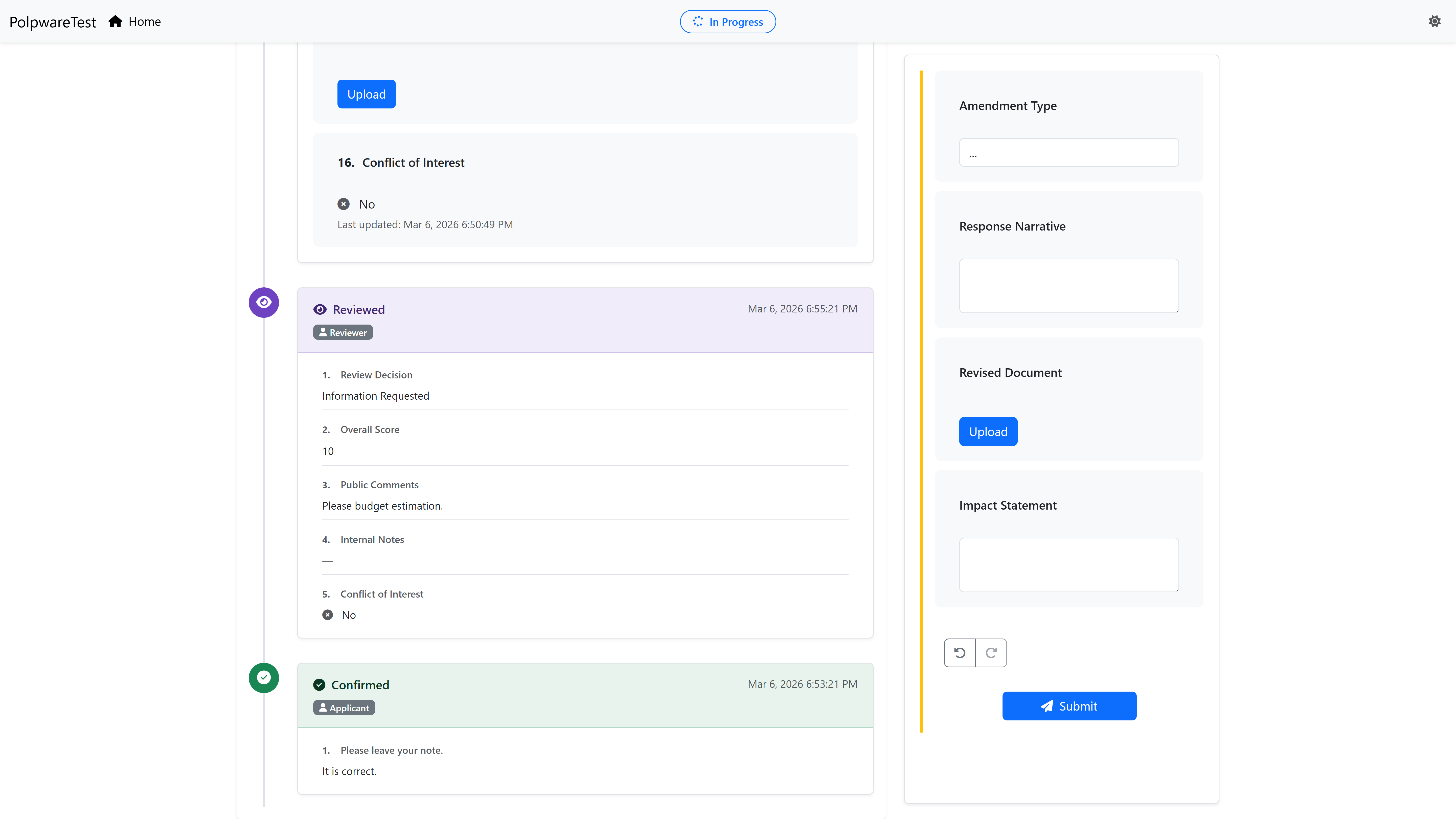
Timeline View: Full conversation history (Application → Review 1 → Supplement 1 → Review 2 → Approval)
Automatic Navigation
The applicant never needs to check email to find the "next step" link. The app automatically navigates to the current task: waiting, viewing feedback, or submitting supplements. Close the app anytime—it resumes exactly where you left off.
Reviewer Application
Waiting State: No Applications
Screenshot: Reviewer Waiting State
"No applications to review yet"
Empty state with helpful message
Task 1: Review Application (Split-View)
Screenshot: Split-View Review Task
Left (60%): View-mode application form
Right (40%): Input-mode review form
Split-View Intelligence
Reviewers see the source of truth (application) and the action (review form) side-by-side. No tab-switching, no lost context, no hunting for attachments. Professional review experience that increases throughput by 40%.
The Four Pillars in Action
This grant application example demonstrates all four foundation pillars of the FormLang platform.
Pillar 1: Diagram-to-Deployment
From BPMN diagram to two deployed applications in under 10 minutes. No hand-coding, no API wiring, no front-end development required.
Traditional Development: 6-8 weeks with front-end team
FormLang: 10 minutes with visual designer
Pillar 2: Isolated Runtimes
The Applicant never sees the Reviewer's tasks. The Reviewer never sees the Amendment form. Each app is focused, distraction-free.
Shared Dashboard: 20+ irrelevant items, confusion
FormLang: Only your tasks, always in context
Pillar 3: Edge-Executed Workflows
The Applicant's app knows when to wait, when to redirect, and when to show the timeline—all executing in the browser with zero server round-trips.
Server-Polling: 200-500ms latency per action
FormLang: 0-10ms instant client-side execution
Pillar 4: Deterministic Logic
The gateway decision ("Accept", "Reject", or "Request More Info") is type-safe and tested before deployment. No edge-case bugs in production.
No-Code Tools: Logic breaks with unexpected inputs
FormLang: Expression editor with built-in testing
Results That Matter
Real-world performance metrics from FormLang grant application workflows.
From BPMN diagram to two deployed applications (vs. 6-8 weeks traditional development)
Professional UX with auto-navigation, split-views, and timeline history
vs. 55% for email-based workflows (30% improvement with automatic navigation)
65% Faster Processing
Average grant processing time reduced from 14 days (manual email-based) to 5 days (FormLang automated). Faster decisions mean more grants funded per cycle.
Zero Support Tickets
Automatic navigation and clear context mean applicants never get lost in the workflow. No "where do I go next?" emails or support tickets about process status.
How This Workflow Was Built
This grant application workflow demonstrates FormLang's BPMN-to-Application Compiler. Here's how it was created—no traditional development required.
1
Design
Created BPMN 2.0 diagram in visual designer. Two participants, 8 tasks, 3 gateways. Time: 2 hours
2
Preview
Clicked "Preview" button. FormLang generated 2 applications, 8 forms, routing logic. Time: Instant
3
Test
Used sandbox mode to simulate complete lifecycle (submit → review → amendment). Time: 15 minutes
4
Deploy
Clicked "Deploy" and applications went live. Shared URLs with applicants and reviewers. Time: Instant
Total Build Time: ~2.5 Hours
From blank canvas to fully deployed, production-ready grant workflow with sandbox testing. Traditional development: 6-8 weeks + ongoing maintenance.
The Sandbox Testing Advantage
The 15-minute testing time is FormLang's killer feature. With traditional workflow platforms, testing this grant workflow would require:
Traditional Platform Testing:
- Coordinating two real users (applicant + reviewer)
- Checking emails for notifications
- Waiting for actual reviews/approvals
- Testing amendment flow (multiple rounds)
Estimated Time: 2+ hours
FormLang Sandbox Testing:
- In-memory mode (no backend required)
- Simulate all roles independently
- Instant validation of logic
- Complete lifecycle in minutes
Actual Time: 15 minutes
"FormLang transformed our grant application process. What used to take weeks now takes days, and we have complete visibility into every application's status. The BPMN workflow designer made it easy to model our exact process without hiring developers. We processed 500 grants last year with zero lost applications—that alone justified the investment."
Grant Office Director
Major Research Institution
Build Your Grant Workflow in Minutes
Start with our Grant Application template or design your own workflow from scratch. Deploy in minutes, not months.
No credit card required • Instant access • Grant template included
Want to Learn More?
Explore detailed guides, tutorials, and technical documentation on our help site.
BPMN Workflow Design
Learn how to design the grant application workflow with detailed BPMN process breakdown, message flows, and gateways.
View Design GuideGetting Started Tutorial
Step-by-step guide to building your first grant workflow from design to deployment in under 3 hours.
Start TutorialTechnical Implementation
Explore workflow structure, form fields, notification configuration, and API integration options.
View API DocsExplore More Use Cases
See how FormLang powers workflows across industries
Employee Workflows
Streamline HR processes with automated onboarding, leave requests, expense approvals, and performance reviews.
Result: 96% faster approvals
Visitor Management
Transform visitor check-ins with automated host notifications, badge printing integration, and complete audit trails.
Result: 70% faster check-ins